
BWS - ALPHA
For Students in Grades 7–12
Advanced Learning via Practical Hands-on Applications
Website Design & Development (No Coding Required)
Learn to Build and Deploy a website from scratch on a server, with 1 real-life project at the end.
- Duration: 1-3 Months
- For: Classes 7-12
- Mode: Live Online
- Medium: English
- Certificate of Completion
*Designed to complement school-level curriculum, skill development and practical technology education.
Get the α Advantage

What is BWS-α?
BWS-α is an initiative of digital skills programs designed for students of Classes 7–12, focused on live learning via hands-on experience rather than theory alone.
Through live online instruction, students are introduced to how modern websites are planned, designed, developed and deployed. The program is structured to help students understand the complete journey of creating a website—from the basic concepts to publishing a working website online.
Students learn at an age-appropriate level, work through guided practical activities, and complete a real website project at the end of the program. The aim is to build digital confidence, creativity, problem-solving ability and practical technology skills that can support future studies, projects and career exploration.
This opportunity is suitable for students who want to understand how the web works, create something of their own, and gain practical exposure to a skill used across today’s digital world.
Learn Practically
Understand concepts through live instruction and guided activities.
Build Something Real
Apply what you learn to create and deploy a complete website.
Prepare for What's Next
Develop digital confidence and a foundation for future technology.
Why do so many IT Enthusiasts Start with Web Development?
Evergreen Skill that Opens Door for IT Journey
Build Confidence
Build your first website and discover, “I can actually do this.” Seeing your own work come alive makes technology feel approachable.
See Results Instantly
Turn your ideas into something you can see, interact with and improve almost immediately.
Begin Without Advanced Coding
Start with simple concepts and gradually move towards more technical skills as your understanding grows.
Learn by Creating
Combine creativity, design, logic and problem-solving while working on something you can actually call your own.
Understand How the Web Works
Learn how websites, browsers, servers, data and the internet work together behind the screen.
Build a Foundation for Future Technology
The fundamentals you learn can support future exploration of software, apps, databases, cloud, cybersecurity and more.
Explore Before You Specialize
Gain practical exposure before deciding whether your interests lie in software, AI, cybersecurity, data, games or another technology field.
A Smart Start for Engineering Aspirants
Get practical exposure before higher studies and enter Computer Science or IT with a clearer understanding of what technology can do.
Curriculum
What you will learn
α-1
Foundation
Entry Level | 1 Month (LEVEL-1)
- How websites work
- Browsers, web pages and the internet
- Basic website structure
- Domains, servers and online publishing
- Understanding website-building platforms
- Setting up a working website environment
- Navigating the website administration area
- Managing basic site settings
- Creating pages and site sections
- Adding text, images and other media
- Menus and basic navigation
- Organizing website content
- Layout and spacing
- Typography and readability
- Colors and visual hierarchy
- Basic user-friendly design principles
- Reusable sections and page elements
- Responsive layouts
- Designing for computers, tablets and mobile devices
- Basic forms and visitor interaction
- Preparing a website for public access
- Connecting the site to a live environment
- Basic checks before publishing
α-2
Foundation + Standard
Intermediate Level | 2 Months (LEVEL-2)
- Planning a website before building
- Content organization
- Consistent layouts across pages
- Navigation and user flow
- Contact and enquiry systems
- Interactive sections
- Forms and response handling
- Essential website extensions
- How domains and servers work together
- Website files and online storage
- Publishing and updating a live website
- Basic troubleshooting
- How search engines discover websites
- Search-friendly page structure
- Titles, descriptions and basic optimization
- Introduction to search performance monitoring
- Basic website security practices
- Updates and compatibility
- Backup concepts
- Recovery and maintenance basics
- Page speed fundamentals
- Image and media optimization
- Mobile usability
- Basic performance checks
α-3
Foundation + Standard + Advanced
Advanced Level | 3 Months (LEVEL-3)
- Advanced page composition
- GUI & UI/UX Concepts
- Motion Effects & Animation
- More refined visual systems
- Reusable design patterns
- Professional presentation
- More complex website interactions
- Conditional behaviour
- Advanced forms and workflows
- Connecting different website functions
- Understanding page structure
- Basic markup and styling concepts
- Introduction to client-side scripting
- Making controlled custom changes
- How websites work with stored information
- Database Concepts
- Connecting websites with external services
- Basic API concepts
- Data-driven website behaviour
- Understanding visitor behaviour
- Website performance indicators
- Search performance analysis
- Using data to improve a website
- Converting a requirement into a website plan
- Choosing appropriate features
- Testing before delivery
- Launch-readiness checklist
- Basic ongoing maintenance planning
Practical Project: Every level includes a guided project or assignment. As students progress through higher levels, the project's scope, functionality and complexity increase accordingly.
How it works?
The Process
1) Complete Enrollment
Complete your Enrollment by filling the details in the form given below, and register yourself for upcoming batch.
2) Join the Batch
Attend the batch along with other students in the cohort and learn building website concepts with the senior devlopers on the go.
3) Complete the Project
By the end of the program you will be given a project based upon gained knowledge & Training so far, complete it as submit it on time.
4) Get Certification
You will get your training certificate upon successful completion of the program, plus the best performers will also be displayed on our website.
Eligibility Criteria
What you need to start
REQUIREMENTS
A PC or Laptop
Required. A Smartphone can not be used for this.
An Active Internet/Wi-fi
Required. For Live Classes and Overall Access.
Understanding of English
Essential. The mode of learning will always be English.
A working Email ID
Essential. For Certificate and other updates.
Must be a Student
You must be student of a school and in betweeen class 7th to 12th
BENEFITS
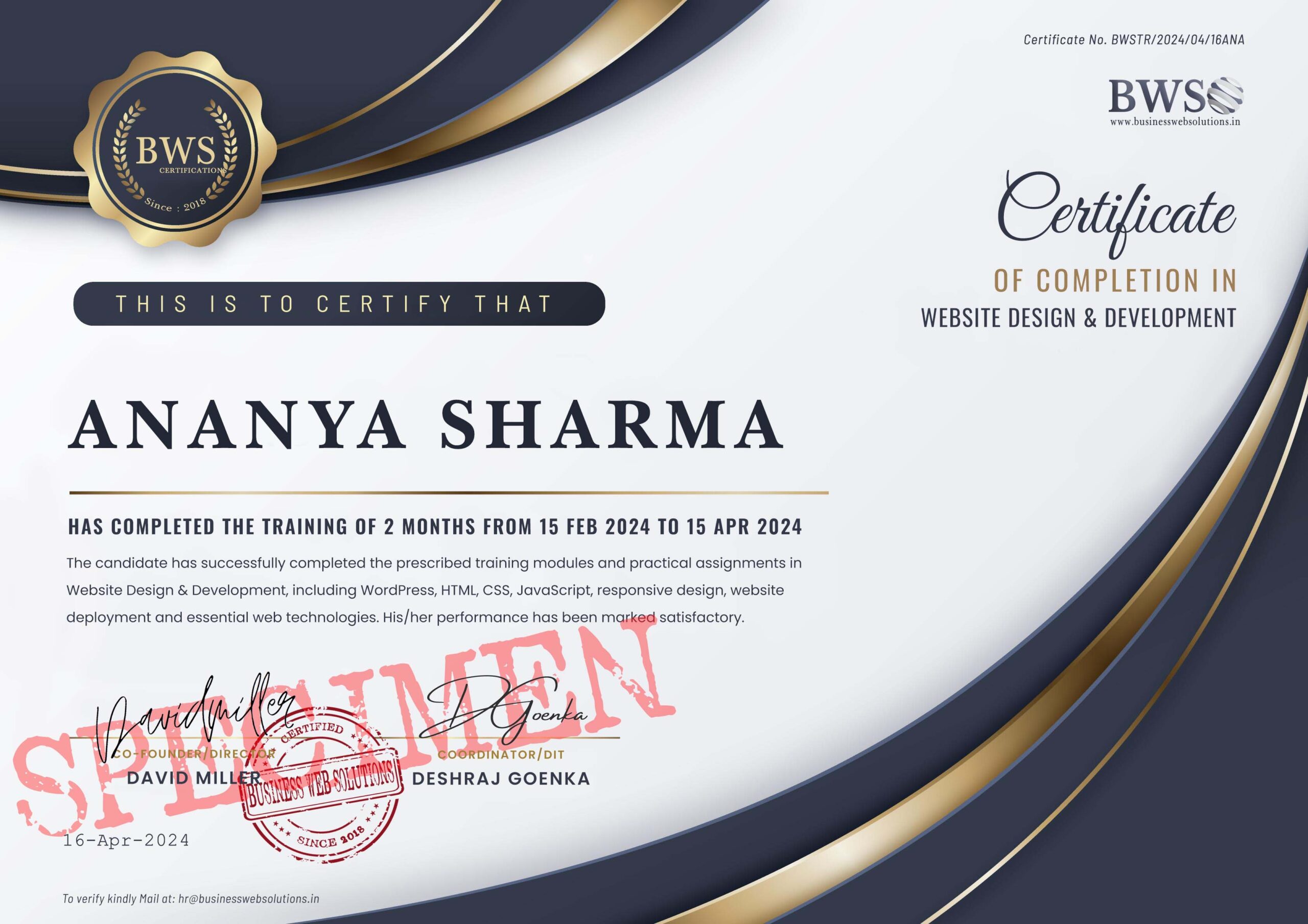
Certificate of Training
A Certificate of Completion will be provided to all.
Learn from Home
100% Online. Learn from the ease of your home.
Hands-on Learning
Learn by building and applying concepts instead of just theory.
Real Project Experience
Complete a website project and gain practical experience.
Future-Ready Skills
Opens the door and possibilities for future technologies.
Sample Certificate
Batch & Time Schedule
Please note: The demo is optional. You can enroll directly and join the upcoming batch.
Enrollment Process
Every Monday - Saturday
Students can enroll at anytime between Monday till Saturday midnight,- Either for the Demo Class of Sunday, or for the Live Classess from Monday.
-
Opens: Monday,
12:01 AM (IST)
-
Closes: Saturday,
11:59 PM (IST)
Seats for the next Monday batch are subjected to availability
Max 20 Students per batch allowed
Allowed exception in some cases
Demo Runs
Every Sunday
(Not Mandatory)
Demo Class Schedule (Sunday only)
Choose a convenient time for demo class
- 10:00 AM - 11:00 AM (IST)
- 11:30 AM - 12:30 PM (IST)
- 1:00 PM - 2:00 PM (IST)
- 2:30 PM - 3:30 PM (IST)
- 4:00 PM - 5:00 PM (IST)
1-to-Many Live Demo
Interactive | Q&A | Real Examples
Batch Runs
Every Monday - Friday
You will be put in a batch of your selected time, and the Live Group Classes will be conducted starting from Monday till Friday (Saturday Closed)
Live Class Schedule (Monday - Friday)
Choose a convenient time for regular class
- 3:00 PM - 4:00 PM (IST)
- 4:15 PM - 5:15 PM (IST)
- 5:30 PM - 6:30 PM (IST)
- 7:00 PM - 8:00 PM (IST)
- 8:15 PM - 9:15 PM (IST)
1-to-Many Live Class
Interactive | Q&A | Real Examples
Enrollment Form
👉 This opportunity is for school students of Classes 7–12 only. If you are not, please do not apply.
Frequently Asked Questions
BWS-ALPHA is designed for students of Classes 7–12. No previous designing, development or coding experience is required. Students are recommended to begin at a suitable level based on their class, knowledge and confidence, but class is not a strict limit on how far they can learn.
Students should have a PC or laptop, an active internet connection and a basic understanding of English.
No. BWS-ALPHA starts from the fundamentals, and a 'NO CODE NECESSARY' Concept, with specialized apps and tools, so beginners can start with α1/Level1 (Foundation). Students with prior knowledge or stronger ability may choose a higher level.
Students can join even if they have never built such a project before.
The program is delivered through live online classes in English, with guided practical activities, learning resources and hands-on project work. Students can learn from home using a PC or laptop and an active internet connection.
A new batch begins every Monday.
Sunday is reserved for demo classes only. Students who completed their enrollment during the week are considered for the upcoming Monday batch, subject to the available schedule and seats.
BWS-ALPHA follows three progressive levels: α1 (Foundation), α2 (Foundation + Standard) and α3 (Foundation + Standard + Advanced). Each higher level adds greater depth, functionality, technical understanding and practical experience.
Every level includes a guided project or assignment. Students work on the same core website project, while its scope, functionality and complexity increase as they progress through higher levels.
α1 (Foundation) runs for 1 month, α2 (Standard) for 2 months, and α3 (Advanced) for 3 months. Each level includes the curriculum covered up to that stage, live training, practical project work, learning resources and a BWS Certificate of Completion upon successful completion.
Yes. Students from outside India can join BWS-ALPHA. Regular batches follow India-friendly timings, while alternate timings may be arranged and definately considered for international students depending on demand and time-zone requirements.
A minimum number of students are required to start and assign a dedicated time-schedule.
Yes. BWS-ALPHA is a paid training program. Students can choose the level that suits their learning goals, with the applicable fee shown during enrollment before payment.
Yes. However BWS-ALPHA is not a replacement for a degree, but it gives students early practical exposure to web technology, programming concepts, databases, servers and digital problem-solving. This can help them better understand their interests before pursuing Computer Science, IT or other technology-related studies.


 Your IP Address : 216.73.216.242